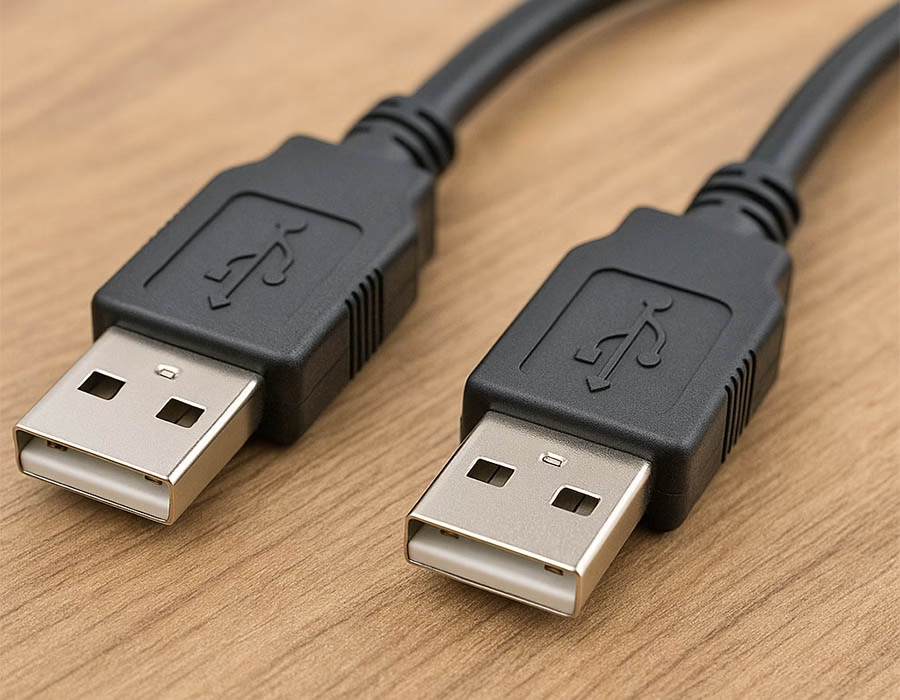
Standard USB setups usually feature a host connector on one end and a device connector on the other. However, a USB male-to-USB male cable breaks this rule and is not part of the official USB standard.
Connecting two computers directly with a passive USB male-to-male cable can damage your hardware by backfeeding power into the motherboard. Despite the risks, a specialized USB male-to-male cable is essential for specific industrial setups, data bridges, and firmware updates. As a leading cable assembly manufacturer, we break down what this unique cable is actually used for below.
Despite this, specialized “bridge” cables exist for PC-to-PC file transfer. These cables contain active electronics and drivers, enabling two PCs to exchange data. One user notes that “the most common use of A to A USB cables… is direct computer-to-computer file transfer utilities”. In other words, you can link two computers, but only with a specially designed USB data bridge (often called a transfer or Easy-Transfer cable), not a passive cord.
Common Uses for a USB Male to USB Male Cable
In practice, USB-A-A cables are commonly used in niche applications. For example, some USB KVM switches and manual device selectors use A-to-A leads to share a single USB peripheral (such as a keyboard or thumb drive) between multiple hosts. A few consumer or industrial devices even have Type-A sockets instead of Type-B. In those cases – specific hard-drive enclosures, audio/video receivers, or instrumentation – you need a male-to-male cable to connect that Type-A port to a PC or charger.
Finally, firmware updates and diagnostics on some equipment may require an A-A cable. Notably, some product notes explicitly mention using a “USB male-to-male” cable to update a device’s firmware (e.g., “Update webcam firmware with USB 3.0 male-to-male cable”). These scenarios are specialized so that you won’t see A–A cables in typical consumer USB setups.
USB Male to USB Male Cable Applications
| Use Case | Compatible Setup | Advantages | Warnings |
|---|---|---|---|
| PC-to-PC Transfer | Two PCs with a USB-A bridge cable (active cable with chip) | Direct high-speed file copy (no network) | Passive A–A cable won’t work; back-feeding power can harm devices. |
| USB Switch / KVM | Manual switch box or KVM using A–A leads | Share one USB device between hosts | Often violates USB spec; low-end switches may malfunction or damage ports. |
| Device w/ USB-A Port | Peripherals (HDD enclosures, controllers, etc.) with USB-A sockets | Can connect via standard host cable | Non-standard config; use only as per device design. |
| Embedded/Industrial | Specialized tools (e.g. CAN analyzers) with Type-A ports | Simplifies connections for industrial gear | Verify pin/power usage; mismatched voltages can be an issue. |
| Firmware Update | Devices (cameras, routers, etc.) with USB-A update ports | Direct firmware flashing/diagnostics | Use the exact cable specified; wrong cable can fail updates or cause damage. |
Custom Cable Solutions
If off-the-shelf cables don’t cut it, a custom manufacturer can help. For example, Romtronic is a Chinese manufacturer specializing in cable assembly with an ISO-certified factory. We can design and manufacture USB male-to-male cables to exact specifications, including any required length, shielding, or connector type, ensuring reliable custom USB cables for industrial B2B applications.
By partnering with a specialized OEM like Romtronic, companies can manufacture A-A cables to the proper standards and use cases, avoiding the pitfalls of generic or non-compliant cables.
Frequently Asked Questions (FAQ)
Answer: No, a standard passive cable will not work and can actually fry your computers’ USB ports. To transfer files directly between two PCs, you need a specialized “bridge” or “data transfer” cable with built-in active electronics and drivers to safely manage data flow.
Answer: Some non-standard hard drive enclosures use a Type-A female port instead of the standard Type-B port to save physical space or simplify internal board design. In these cases, a male-to-male cable is required to connect the drive to your computer.
Answer: No. As noted in the article, passive male-to-male Type-A cables violate the official USB specifications. Because they pose a risk of connecting two host power supplies, they are considered a non-standard configuration used only in specialized setups.
Answer: Yes. Many consumer and industrial devices—such as webcams, routers, and single-board computers—rely on a male-to-male cable for direct firmware updates. The cable allows developer tools to bypass normal OS restrictions and flash the internal storage directly.
Answer: Absolutely. Because these cables connect pin-to-pin across ports that typically output power, poor shielding or incorrect wiring can cause severe electrical shorts. For industrial or B2B applications, using custom, certified cables is crucial to protect your equipment.
.avif)
Sam Wu is the Marketing Manager at Romtronic, holding a degree in Mechatronics. With 12 years of experience in sales within the electronic wiring harness industry, he manages marketing efforts across Europe. An expert in cable assembly, wiring harnesses, and advanced connectivity solutions, Sam simplifies complex technologies, offering clear, actionable advice to help you confidently navigate your electrical projects.