Premier Manufacturer

When I first stepped onto a factory floor with a web of cables running between the machinery, I had a realization: One of the unrecognized champions in the world of industrial networking is not the PLC or the switch, but instead the M12-to-RJ45 cable.
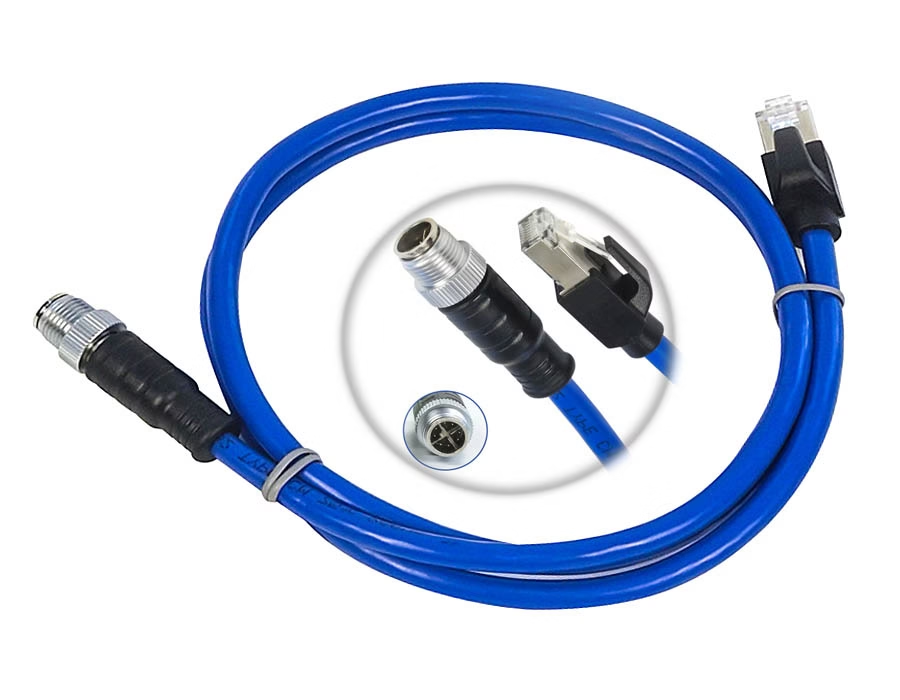
These cables facilitate the connection of rugged field devices, such as sensors, HMIs, and robots, to a standard Ethernet network without requiring extensive effort. One side features the M12 connector, a 12 mm threaded, IP65/IP67-rated plug that is resistant to dust, vibration, and water.
On the other hand, the familiar RJ45 connector, a connector almost synonymous with the term Ethernet, is the same one used by your laptop. Together, they link two worlds: that of a rugged factory or process environment and the controlled IT rack.
In this guide, we will cover the wiring of M12-to-RJ45 cables (pinout), how to terminate and ground the shields, and how to ensure that you make the right decisions when selecting and maintaining the cable.
What Is an M12 to RJ45 Cable?
In layman’s terms, an M12-to-RJ45 cable facilitates the connection of rugged industrial devices to off-the-shelf Ethernet networks.
- M12 side: The M12 side is circular, screw-threaded, watertight, and vibration-resistant, and it is generally found on machines, control panels, and sensors.
- RJ45 side: The RJ45 side is the ubiquitous 8P8C connector commonly found on computers, switches, and routers.
This cable is designed to enable the connection of industrial equipment to IT infrastructure using standard Cat5e or Cat6 Ethernet cables.
There are multiple types of M12 connectors:
- D-coded (4-pin), suitable for 100 Mbps Ethernet and Profinet.
- X-coded (8-pin), ideal for Gigabit or 10G Ethernet.
- A-coded, typically used for sensors or as input for a vision system.
The outer jacket material (PVC, PUR, TPU) is based on your environment. PUR and TPU are resistant to oil, abrasion, and continuous movement.
(If you would like to learn more about rugged industrial cables, check out our Ethernet Cable Assemblies page.)
M12 to RJ45 Pinout Configuration
Obtaining the correct pinout is crucial and cannot be overlooked. For a D-coded M12 (4-pin) connection to an RJ45 100Base-TX Ethernet connection, the standardized mappings are as follows:
| Function | M12 Pin | RJ45 Pin | Description |
|---|---|---|---|
| TX+ | 1 | 1 | Transmit Data + |
| TX– | 3 | 2 | Transmit Data – |
| RX+ | 2 | 3 | Receive Data + |
| RX– | 4 | 6 | Receive Data – |
In short:
Pin 1 –> 1, Pin 3 –> 2, Pin 2 –> 3, Pin 4 –> 6.
The cable shield (drain wire) should be connected to the shield of the RJ45 to provide a complete ground at 360°.
For the X-coded (8-pin) M12 connectors, the four twisted pairs match the 8-pin layout of the RJ45 and operate at Gigabit or 10G Ethernet speeds. Always match D-coded connectors to D-coded connectors and X-coded connectors to X-coded connectors. They are mechanically keyed, meaning you cannot mix and match D-coded and X-coded connectors or pins.
A single wiring error can cause significant performance issues, including reduced speed, dropped packets, or connection failure.
Shield Termination in Industrial Ethernet Cables
Factories have lots of electromagnetic noise – motors, welders, drives, or whatever you want to call it. A cable’s shield will block that interference, but only if the cable is terminated correctly.
Here’s how it’s done:
- Crimp the braided shield or drain wire to the metal backshell or ground tab of the connector.
- Use either a crimp-on 360° shield ring to ensure that the metal shell of the connector makes direct contact with the braid.
- With the RC45 termination, wrap the drain wire around the ground tab of the plug and crimp it securely in place.
And ground; don’t ground one end, but properly ground both ends (to the same chassis ground) to keep the cable shield from acting as an antenna. A continuous conductive path to ground is what we aim to achieve with respect to all stray noise.
An effective and properly terminated shield turns an Ethernet cable into a quiet data tunnel, dismissing factory interference.
Applications of M12 to RJ45 Cables
M12-to-RJ45 cables can be found in all application areas that require rugged Ethernet:
- Factory automation: PLCs, HMIs, vision systems, and robotic arms.
- Machine vision: Cameras from companies like Cognex or Keyence that connect to network switches.
- Process control: Sensors and actuators on tanks, pumps, and valves.
- Outdoor or mobile equipment: Traffic systems, rail equipment, and IP cameras.
As the M12 features a screw lock and an IP67 rating, it is ideal for use in wet environments and/or equipment that may be subjected to vibration. In outdoor settings, a sealed M12 to RJ45 connection is the best option for achieving waterproof Ethernet performance.
They are the backbone of many industrial Ethernet cable assemblies, especially when assembled with Cat5e for D-coded connections or Cat6A for X-coded Gigabit connections.
How to Choose the Right M12 to RJ45 Cable
Here’s what to look for:
- Coding & Category – D-coded (Cat5e, 100 Mbps) or X-coded (Cat6A, Gigabit/10G).
- Shielding & Jacket – Select shielded construction. Jackets of PUR or TPU provide oil resistance and durability.
- Connector Style – Straight, angled, or panel-mount connector styles are available. Evaluate male or female connectors.
- Protection & Durability – IP67/IP68 ratings and drag-chain flex-life ratings.
- Quality Control – Reputable manufacturers will test for continuity, shielding, and crimp strength.
Romtronic’s Custom Cable Assembly Services include continuity and shield testing for every assembly to ensure that the assembly meets factory-level performance standards.
Best Practices for Assembly & Maintenance
- Bend Radius: Avoid kinking the cable; use the minimum bend radius (~8 times the cable diameter).
- Tighten Securely: M12 nuts can be tightened by hand to ensure the O-ring is sealed.
- Check Shield Continuity: Use a multimeter after assembly.
- Routine Visual Inspections: Replace any cable with clearly corroded or damaged connectors.
- Cable Management: Keep cables away from high-voltage lines and moving machines.
- Measure Link Speed: A simple Ethernet tester should be able to detect slight wiring issues.
By implementing these practices, you can minimize downtime and EMI issues in industrial settings.
(For more in-depth expertise on wiring, please refer to our manufacturing processes and services.)
Conclusion
M12-to-RJ45 cables may not be the most popular choice for industrial Ethernet systems, but they remain a crucial component. They’re rugged enough for extremely tough environments, and their reliable connectivity ensures seamless communication.
With the proper pinout, terminated shield, and correct connections, you’ll have a clean, reliable link for many years.
At Romtronic, we build and test every industrial Ethernet cable assembly to assure consistency, quality, and durability. Does your application require a custom assembly with dual M12 connectors, a specific length, or a sensor harness with integrated cabling? We’ll do whatever is needed.
Reliable data starts with a good connection. It begins with a properly tested/built M12-to-RJ45 cable.
FAQs
Q: Are M12-to-RJ45 connectors waterproof?
Yes. When paired, M12 connectors have an IP67 rating, meaning they are dust-tight and water-tight. The RJ45 end is typically IP20, unless it features a sealed housing design or an IP68-rated coupler.
Q: Can I connect an X-coded M12 to a D-coded port?
No. D-code and X-code connectors have different physical keyed ends. Always use the same coding. D to D, X to X.
Q: Why not just use RJ45 everywhere?
Manufacturing environments are often cramped for space and require reliable connections. M12 is compact, occupying less panel space, and withstands vibration while sealing out moisture. RJ45 cannot do this. An M12 to RJ45 cable can provide durability and compatibility.
.avif)
Sam Wu is the Marketing Manager at Romtronic, holding a degree in Mechatronics. With 12 years of experience in sales within the electronic wiring harness industry, he manages marketing efforts across Europe. An expert in cable assembly, wiring harnesses, and advanced connectivity solutions, Sam simplifies complex technologies, offering clear, actionable advice to help you confidently navigate your electrical projects.