Premier Manufacturer

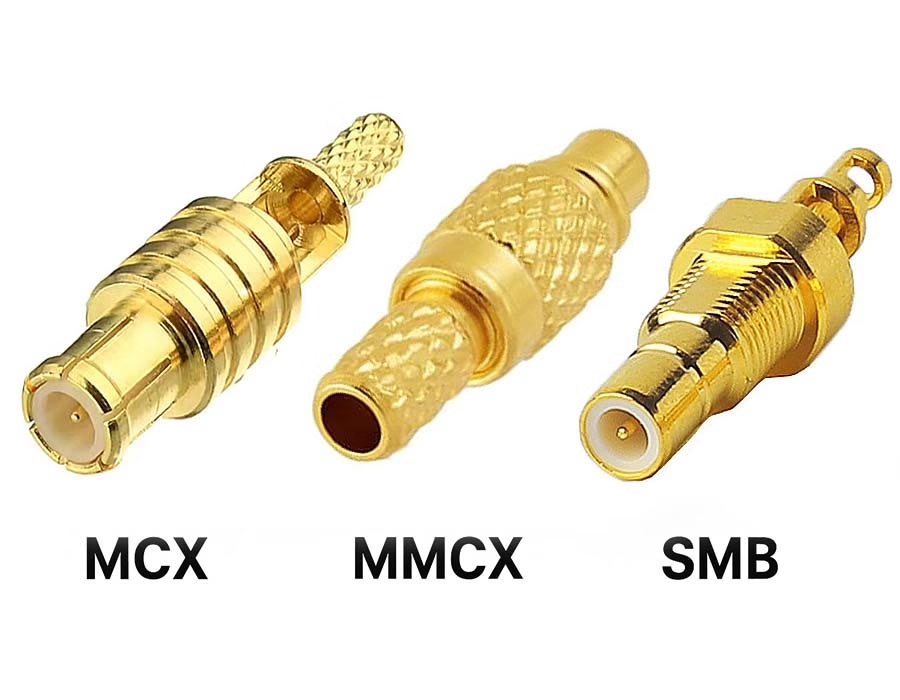
If you’ve ever used RF modules, antennas, or any other tiny devices that utilize high-frequency connections, you may have seen MCX, MMCX, and SMB connectors a lot. All three connector types are relatively small (for RF connectors), all have a very similar appearance, and all engage through a snapping connection; so what could make them so different?
The truth is…they’re actually considerably different from each other.
Here you’ll find an easy-to-understand, practical comparison to help you determine which connector type is best suited for your project without searching through numerous pages of specifications.
MMCX: The Tiny Connector That Fits Almost Anywhere
Think of MMCX as the ultra-compact cousin in the family.
It’s super small, supports 360° rotation, and is built for devices where the cable needs to move without stressing the connector.
You’ll see MMCX in things like:
- Wearables
- Fitness trackers
- IoT sensors
- Bluetooth modules
- In-ear monitors
- Portable medical devices
If your design is tight on space or needs flexibility, MMCX is usually the better choice.
MCX: Small, Solid, and Reliable
MCX connectors are slightly larger than MMCX connectors, but still very compact. They use the same snap-on style, but they’re sturdier and feel more “locked in.”
They’re an excellent fit for:
- GPS modules
- Automotive electronics
- Wireless LAN products
- Industrial RF boards
- Test and measurement tools
If you need something small but more challenging than MMCX, MCX is the sweet spot.
SMB: Quick to Connect, Built for Frequent Use
SMB connectors are bigger than MCX and MMCX, but still fall into the “mini RF connector” category. What makes SMB popular is how fast they connect — push, snap, done.
Typical uses include:
- Telecom equipment
- RF test setups
- Navigation systems
- Medical imaging devices
- PCB-to-PCB RF connections
These are great when you need to plug/unplug things often or want a quick, no-twist connection.
Quick Comparison Table
| Feature | MCX | MMCX | SMB |
|---|---|---|---|
| Size | Compact | Very small | Larger sub-miniature |
| Mating | Snap-on | Snap-on + 360° rotation | Push / snap-on |
| Durability | Stable and rugged | Flexible but less durable | Good under vibration; fast mating |
| Frequency | Up to 6 GHz | Up to 6 GHz | Up to ~4 GHz (varies) |
| Impedance | 50Ω / 75Ω | 50Ω (some 75Ω) | 50Ω / 75Ω |
| Best for | GPS, automotive, RF modules | Wearables, IoT, tiny devices | Telecom, test gear, quick-connect systems |
How to Pick the Right One
1. Tight on Space?
Go MMCX. It’s the smallest and gives you cable flexibility without stressing the joint.
2. Need Stability?
Choose MCX. It’s compact but more rigid, great for automotive, GPS, or anything that vibrates.
3. Need Fast, Frequent Connections?
Go SMB. Perfect for lab setups, telecom racks, or systems you disconnect often.
4. Frequency Requirements
- MCX & MMCX → handle up to 6 GHz
- SMB → usually around 4 GHz, depending on the model
5. Matching Impedance
All three offer 50Ω options; some have 75Ω for video/digital systems.
Just match your system — simple as that.
6. Cost Consideration
General trend:
SMB < MCX < MMCX
(MMCX costs a bit more because it’s ultra-miniature.)
Final Takeaway
MCX, MMCX, and SMB connectors all bring something different to the table.
- If you want tiny and flexible, pick MMCX.
- If you want small but stable, go to MCX.
- If you want quick connect/disconnect, choose SMB.
Once you know your size, frequency, and connection style, the right choice becomes pretty obvious.
.avif)
Sam Wu is the Marketing Manager at Romtronic, holding a degree in Mechatronics. With 12 years of experience in sales within the electronic wiring harness industry, he manages marketing efforts across Europe. An expert in cable assembly, wiring harnesses, and advanced connectivity solutions, Sam simplifies complex technologies, offering clear, actionable advice to help you confidently navigate your electrical projects.