What is an OBD Cable?
OBD cables connect a vehicle’s engine control unit (ECU) to a diagnostic tool. The cable plugs into the standard 16-pin OBD-II port (usually under the driver-side dash) to transmit real-time engine data, error codes, and system status.

OBD-II was mandated for new cars in the US by 1996 (and in Europe by the early 2000s). This standardization means one cable design works across many vehicle models, simplifying diagnostics.
OBD-I vs OBD-II: Key Differences
Before choosing a cable or troubleshooting a “no signal” issue, confirm which generation your vehicle uses — the two are not interchangeable.
| OBD-I | OBD-II | |
| Era | Pre-1996 (US) | 1996–present (US); early 2000s+ (EU, as EOBD) |
| Connector | Manufacturer-specific (no standard shape) | Standardized 16-pin J1962 (trapezoidal) |
| Protocols | Proprietary, varies by OEM | ISO 9141-2, KWP2000, SAE J1850, CAN (ISO 15765) |
| Diagnostic scope | Limited, engine-only on most models | Engine, transmission, emissions, and more |
| Typical use today | Vintage vehicles, legacy fleet equipment | All modern passenger vehicles and most trucks |
Heavy-duty trucks and off-road/industrial vehicles often use a separate 9-pin (SAE J1939) or 6-pin Deutsch connector rather than the passenger-car 16-pin OBD-II plug — worth confirming before ordering a cable.
OBD Cable Types and Standards
Modern vehicles (manufactured since 1996) use OBD-II cables with a standard 16-pin connector. These cables support multiple protocols (ISO 9141-2, ISO 14230/KWP2000, CAN ISO 15765, and others).
Older vehicles (pre-1996 OBD-I) and heavy-duty trucks use unique diagnostic connectors (6-pin or 9-pin Deutsch plugs) and protocols like SAE J1939.
How OBD Cables Work
An OBD cable carries data from the vehicle’s ECU to a diagnostic tool. It relays messages between the vehicle’s computer and an OBD-II scanner when plugged in. This lets technicians retrieve trouble codes, view live sensor data, and reset warning indicators.
16-Pin J1962 Connector Pinout Reference
The most common question we get from engineers sourcing custom OBD assemblies is “which pins do I actually need wired?” Here is the standard SAE J1962 pin assignment:
| Pin | Signal | Notes |
| Pin 2 | SAE J1850 Bus+ | Used on older Ford/GM protocols |
| Pin 4 | Chassis Ground | Required on every cable |
| Pin 5 | Signal Ground | Required on every cable |
| Pin 6 | CAN High (ISO 15765-4) | Standard on all vehicles 2008+ |
| Pin 7 | ISO 9141-2 / ISO 14230 K-Line | Common on 1996–2007 Euro/Asian imports |
| Pin 10 | SAE J1850 Bus− | Older Ford/GM protocols |
| Pin 14 | CAN Low (ISO 15765-4) | Standard on all vehicles 2008+ |
| Pin 15 | ISO 9141-2 / ISO 14230 L-Line | Paired with Pin 7 |
| Pin 16 | Battery Power (+12V) | Required on every cable |
Note: not every pin is populated on every vehicle — which pins carry signal depends on which protocol the ECU uses. This is why a cable that wires all 16 pins (rather than a cut-down 4- or 6-wire version) is more universally compatible across makes and model years.
Technical Specifications and Design
- Connectors: High-quality OBD cables feature gold-plated, corrosion-resistant pins and solid strain-relief boots. The standard cable utilizes a 16-pin J1962 plug for the car and typically features a USB or serial plug on the scan tool end.
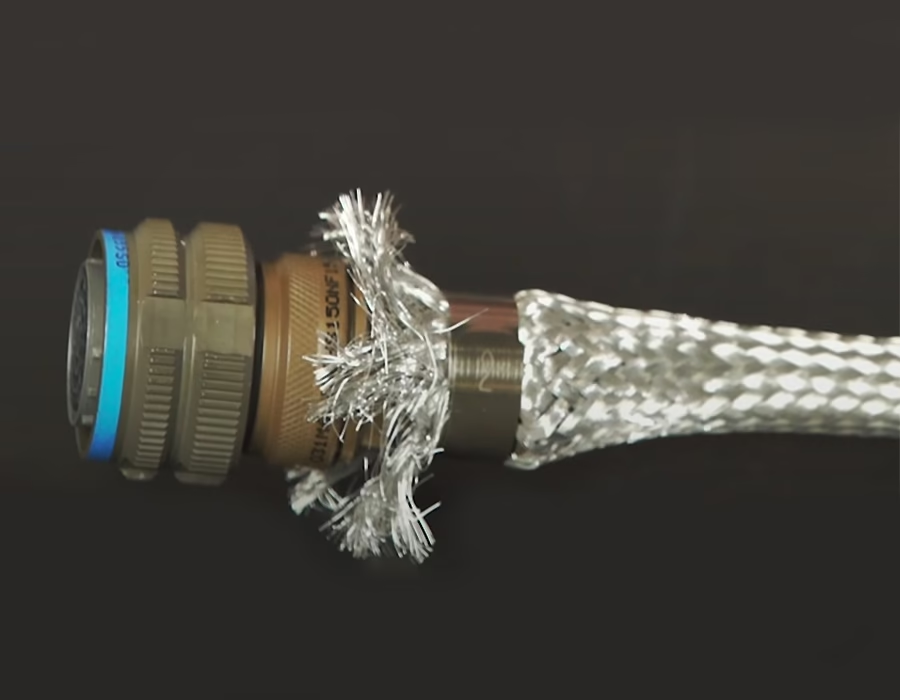
- Construction: These cables often have twisted-wire pairs and braided shielding to protect CAN bus signals from electromagnetic interference. A durable jacket (PVC or thermoplastic rubber) protects the wires from heat, oil, and abrasion.
- Length & Jacket: Standard OBD cables are usually 1–3 meters long. Extension versions up to 15m exist (e.g., Kvaser’s cable with a flexible thermoplastic rubber jacket). A PVC or rubber jacket protects against heat, oil, and wear.
Communication Protocol Comparison
Choosing (or specifying) the right protocol support matters for compatibility. Here’s how the four main OBD-II protocols compare:
| Protocol | Typical Vehicles | Signal Type | Still in Use? |
| SAE J1850 (PWM/VPW) | Older Ford / GM (1996–2003) | Pulse-width / variable pulse | Largely phased out |
| ISO 9141-2 | Chrysler, European & Asian imports (1996–2007) | Single K-line, serial | Legacy, still found in service fleets |
| ISO 14230 (KWP2000) | European & Asian vehicles (2003–2007) | K-line, faster init than 9141-2 | Legacy |
| CAN (ISO 15765-4) | All vehicles 2008+ (US mandate) | Twisted-pair differential (CAN-H/CAN-L) | Current standard |
Common Applications
- Vehicle Diagnostics: Mechanics use OBD-II scanners to read fault codes, monitor emissions, and check engine lights.
- ECU Programming & Tuning: Updating the engine control unit’s firmware (for tuning or key programming) typically requires an OBD cable.
- Telematics & Fleet Management: OBD cables allow fleet tracking devices and IoT systems to stream real-time vehicle data (like speed, location, and diagnostics) to the cloud.
- Development & Testing: Software developers and engineers utilize OBD simulators and cables to test ECU protocols and diagnostic tools, eliminating the need for a physical vehicle.
Common Challenges and Customer Pain Points
- Compatibility Confusion: Customers may not know which cable is compatible with their vehicle (OBD-I vs. OBD-II, car vs. truck). Using a mismatched connector or protocol can prevent any data communication.
- Data Errors & Interference: Cheap or poorly shielded cables can pick up electrical noise, causing inaccurate readings or lost data, which wastes time chasing false problems.
- Build Quality: Frequent use can damage low-quality cables. Common issues include broken pins, loose connectors, and cracked jackets, all of which can interrupt communication.
- Workspace Constraints: Limited cable length or rigidity can make connecting to the OBD port hard, especially in cramped engine bays or on large trucks.
How to Choose the Right OBD Cable
- Match Your Vehicle: Ensure that the cable supports your vehicle’s OBD standard and protocol (e.g., OBD-II, SAE J1939).
- Check Connectors: Ensure both ends fit your car and the diagnostic tool. A standard OBD-II cable has a 16-pin plug for the vehicle; check if you need adapters (e.g,. 9-pin for trucks).
- Quality and Durability: Choose a rugged cable from a reputable manufacturer. Look for braided or foil shielding, robust strain relief, and corrosion-resistant plating on pins to avoid signal errors and breakage.
- Length and Flexibility: Select a length that comfortably reaches from the port to your tool. Longer cables (e.g., 5 m or longer) are available for large vehicles. Flexible jackets (made of PVC or rubber) help maneuver around engine bays.
- Certification: Use cables that comply with automotive standards or come from trusted suppliers. Certified cables often come with warranties and traceable quality control.
Building a one-off DIY OBD2-to-USB reader? See our DIY Guide for ELM327 wiring and USB connector selection. Sourcing cables for production, fleet, or OEM volumes? Go to our Custom OBD Cables page for manufacturing capabilities and quoting.
Frequently Asked Questions
What’s the difference between OBD-I and OBD-II? OBD-II is the standardized system mandated in the US from 1996 (early 2000s in the EU) with a universal 16-pin J1962 connector; OBD-I used manufacturer-specific connectors and protocols and is now found mainly on vintage vehicles.
Which pins are actually required for a working OBD cable? At minimum, ground (pins 4 & 5) and battery power (pin 16) plus the vehicle’s active protocol lines — commonly CAN High/Low (pins 6 & 14) on 2008+ vehicles, or K-Line (pins 7 & 15) on older ISO 9141-2/KWP2000 vehicles. A cable wired for all 16 pins covers every protocol without needing to know the vehicle’s exact spec in advance.
Can I use a CAN-only cable on a pre-2008 vehicle? Not reliably. Pre-2008 vehicles may use J1850, ISO 9141-2, or KWP2000 instead of CAN, so a cable or scan tool that only supports CAN will show no communication on those vehicles.
Do heavy-duty trucks use the same OBD cable as passenger cars? No — most use a 9-pin SAE J1939 (Deutsch) connector rather than the 16-pin J1962 plug, so a dedicated adapter or truck-specific cable is required.
Romtronic’s OBD Cable Solutions
Romtronic specializes in custom OBD cable assemblies for North American and European industrial customers. We offer tailored solutions—from standard 16-pin automotive cables to specialized adapters for heavy trucks and motorcycles.
Each cable is constructed with industrial-grade materials and undergoes rigorous quality control. Our capabilities include custom connector configurations, extended lengths, enhanced shielding, and support for multiple data protocols.
For example, our portfolio includes specialized adapters for motorcycles (3-pin OBD) and heavy-duty trucks, as well as standard passenger-vehicle cables.
- Custom Capabilities: We build each OBD cable to customer specs (connector type, length, shielding, pinout) for any application.
- High Quality: We use premium conductors and overmolded connectors. Every cable is tested for pin continuity and signal integrity to ensure compliance with industrial standards.
- Industry Experience: With decades of experience in cable and harness manufacturing, Romtronic understands the automotive and industrial diagnostic needs. We stay current with OBD and CAN standards for full compatibility.
- Global Service: We serve North American and European markets, offering technical support, quick prototyping, and ISO-certified production to ensure on-time delivery and consistent quality.
🔽 Check out some of our custom OBD cables below.


.avif)
Alex Wang is the Marketing Manager at Romtronic, with a degree in International Business and over seven years of experience in the electronic cable and wire harness industry. He leads marketing efforts across North and South America, combining deep industry knowledge with strong sales experience.
In addition to overseeing global marketing strategy, Alex is also responsible for content development and editorial coordination, ensuring that Romtronic’s messaging remains clear, consistent, and engaging. His strength in market analysis and customer-focused approach helps clients make more informed purchasing and sales decisions.