In networking, RJ45 and RJ50 are two related but distinct modular connectors. At a glance, the key difference is the pin count: RJ45 (8P8C) has 8 contacts, whereas RJ50 (10P10C) has 10. The answer lies in their design and usage. RJ45 (often called “Ethernet cable”) is the ubiquitous 8-position connector used for Ethernet LANs.
By contrast, RJ50 is a slightly larger 10-pin connector typically used in specialized or industrial equipment. Both connectors appear similar in shape, but the RJ50 has an additional two pins, allowing for more signal lines.
RJ45: The 8P8C Ethernet Standard
The RJ45 connector is an 8-position, 8-contact (8P8C) modular plug-and-jack connector. It is the standard interface for Ethernet cables (Cat5e/Cat6) and many network applications. An RJ45 cable contains four twisted-pair wires (eight conductors) wired to T568A or T568 B color-coded pinouts.
In practice, RJ45 cables plug into network ports on PCs, routers, switches, and other devices. This hardwired connection delivers high-speed data (up to 10 Gbps or more on Cat6/Cat7 cables) with low latency.

Due to its 8-wire design, RJ45 is well-suited for Ethernet and PoE (Power over Ethernet) systems. It is the “go-to” connector for home and enterprise networks, Wi-Fi access points, VoIP phones, IP cameras, and data centers. According to DigiKey, RJ45 connectors provide reliable wired connectivity between Internet-enabled devices (PCs, servers, smart TVs, etc.) for higher throughput and security.
They’ve even been adapted for industrial use – modern RJ45 designs (often shielded) appear in factory automation, robotics, IoT control systems, and other harsh environments. In short, if you’re wiring a standard LAN or any Ethernet application, RJ45 is the connector you’ll use.
RJ50: 10P10C for Specialty Connections
The RJ50 connector (also known as 10P10C) resembles an RJ45 but has 10 positions and 10 contacts. There is no formal “RJ50” in the telephone jack standards – it’s a colloquial name for the 10P10C modular plug/jack. Physically, RJ50 is nearly the same width as RJ45 but longer to accommodate two additional pins.
Importantly, RJ50 is not interchangeable with RJ45 even though the plugs share a similar outline. An RJ50 jack can accept an RJ45 plug (with two pins missing), but an RJ50 plug won’t fit an RJ45 jack.
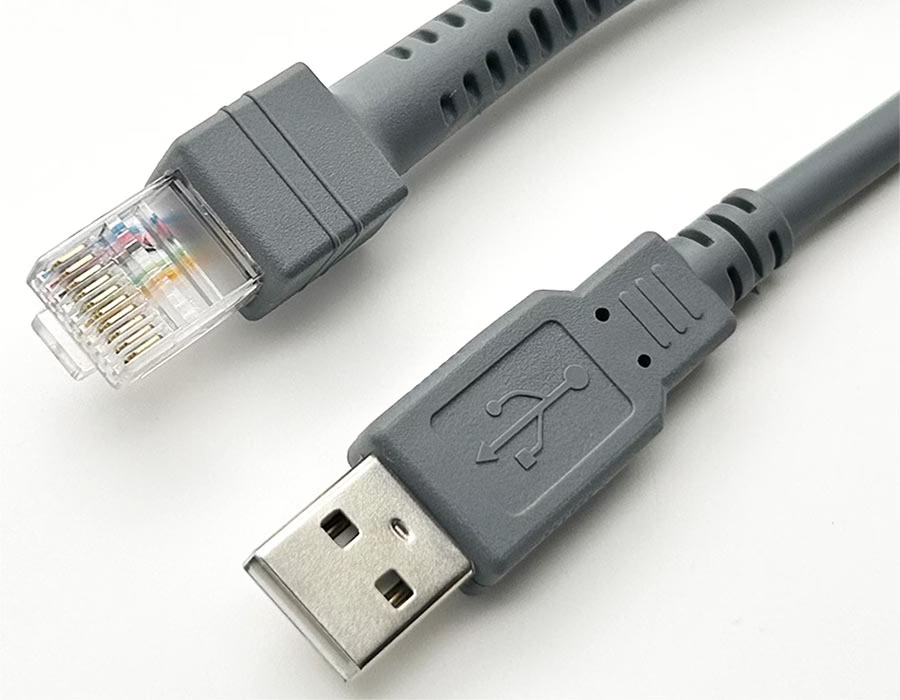
RJ50’s extra pins make it a good choice for applications that require more conductors than a standard Ethernet cable provides. Typical uses include serial and multi-signal equipment. For example, point-of-sale (POS) systems often use 10-pin connectors to link terminals with cash drawers, printers, and scanners. Industrial machinery, PLC controllers, and sensors often use RJ45 cables to carry multiple control or feedback lines through a single connector. Medical devices (e.g., laboratory instruments and monitoring systems) also use RJ50 connectors for complex data and power wiring.
Because there is no single RJ50 wiring standard, pin assignments vary by manufacturer and purpose. One device’s RJ50 port might map pins 1–8 to RS-232 signals and 9–10 to power, while another might use all 10 as data lines. Cables are often custom-made or based on Cat5e twisted pair, but with 10-wire heads.
In general, RJ50 is a niche connector – it’s much less common than RJ45 and is used mainly in proprietary or legacy equipment. However, in those niches, additional contacts make a significant difference.
RJ45 vs RJ50: Key Specifications
| Feature | RJ45 (8P8C) | RJ50 (10P10C) |
|---|---|---|
| Positions/Contacts | 8 positions, 8 contacts (8P8C) | 10 positions, 10 contacts (10P10C) |
| Pinout Standard | TIA/EIA-568 wiring (T568A/B) for Ethernet | No universal standard – custom pinout |
| Cable Type | Cat5e/Cat6 twisted pair Ethernet cables | Often Cat5e-based or custom 10-conductor cable |
| Typical Uses | LAN/Ethernet, PoE, voice (RJ61) | POS terminals, industrial/control equipment, medical devices |
| Bandwidth | Supports Gigabit+ networks via Cat5e+ | Designed for lower-speed serial/data/control signals |
| Physical Size | Standard modular width | Similar width; longer body for extra pins |
| Compatibility | Fits standard RJ45 jacks | Requires RJ50 jack; RJ45 plug fits with missing pins |
| Wiring | Defined by color code (8 wires, 4 pairs) | Flexible: may carry >4 wire pairs or mixed signals |
The table shows that RJ45 is the standard Ethernet connector with eight wires and well-defined wiring conventions, whereas RJ50 adds two wires for additional signals. RJ50 cables are usually custom-made and labeled explicitly as 10P10C or “10-pin RJ45.” Some manufacturers even refer to RJ50 as a “10P10C Ethernet cable,” even though it isn’t a proper Ethernet standard.
Common Applications
RJ45 (8P8C) connectors appear everywhere in networking. You’ll find them in corporate LANs, home routers, network switches, DSL/cable modems, Wi-Fi access points, PoE devices, IP cameras, VoIP phones, and other similar devices. In data centers, RJ45 (and its shielded counterpart, the EtherCON connector) links servers and switches.
Even consumer electronics (such as game consoles and smart TVs) often include RJ45 Ethernet ports. Thanks to standardized cabling (Cat5e/Cat6) and protocols (IEEE 802.3 Ethernet), RJ45 has become the backbone of structured cabling.
Beyond typical networks, RJ45 has moved into industrial settings. Special ruggedized RJ45 ports connect factory machines, robots, and test equipment. For example, industrial automation platforms often utilize Ethernet-based protocols (such as EtherCAT and Profinet) via RJ45 connectors. Quality-control systems and IoT devices also commonly use RJ45; DigiKey notes that new RJ45 standards cater to the needs of factory automation and robotics.
RJ50 (10P10C), on the other hand, is found in more specific contexts. Key industries and use cases include:
- Retail/POS: Cash registers and checkout terminals often utilize RJ-50 cables to connect printers, barcode scanners, keyboards, and cash drawers. The extra pins enable multiple peripherals to share a single connector on the terminal.
- Industrial Automation: Factories use RJ50 for multi-signal machine links. For example, a CNC machine or sensor array might use an RJ50 cable for both data and control signals to a controller.
- Medical Equipment: Diagnostic devices and patient monitors often have 10-pin modular jacks for connecting probes, displays, or lab peripherals. The additional conductors ensure accurate, real-time data transfer.
- Telecom & Specialty: Some telecom and microwave equipment, as well as legacy serial networks, utilize RJ-45 connectors. For instance, specific Motorola two-way radios and test instruments utilize RJ-45 10P8C connectors for multi-line I/O.
In short, RJ50 is used when a piece of equipment requires more conductors than a standard Ethernet cable can provide. It’s especially common in OEM or OEM-like setups (POS, printers, control panels). Note that many end-users recognize an RJ50 cable as “a thicker RJ45 cable” with two extra wires – some sellers even label it “Cat5e 10P10C cable.”
Choosing RJ45 or RJ50
For typical networking, choose RJ45. It’s the industry standard for Ethernet, with fully defined pinouts and wide availability of cables and jacks. You can buy Cat5e/Cat6 cables with RJ45 ends off the shelf. RJ45 also supports Power-over-Ethernet (PoE), making it ideal for powering devices with a single cable.
Consider RJ50 only if your equipment explicitly requires it. Check your devices’ documentation: if it mentions a 10P10C or “10-pin” connector (often labeled RJ50), or if you see a wider plug than an RJ45, then use RJ50.
For example, if a barcode scanner or control box has a ten-pin jack, an RJ50 cable will be needed. Because wiring isn’t standardized, you may need a custom cable or a proper adapter. When building or ordering RJ50 cables, note that they often use the same Cat5 twisted-pair cable, but with 10P10C plugs.
Both RJ45 and RJ50 connectors come in shielded or unshielded versions. Shielded RJ45 (STP) is used in electrically noisy environments; likewise, shielded RJ50 cables are offered for industrial settings. However, simply having more pins (RJ50) doesn’t automatically make it better for high-speed networking – RJ50 is usually used to carry slower serial or control signals, so it doesn’t support, for example, gigabit Ethernet protocols out of the box.
In practical terms, RJ45 vs RJ50 is not a competitive choice but a compatibility one: you use whichever one your hardware requires. As Hotenda’s Q&A notes, “RJ50 connectors are sometimes referred to as ‘RJ45 10 pin’ cables… RJ45 connectors have eight pins, whereas the RJ50 connectors are the same physical size, but with 10 pins”.
If you tried plugging an RJ45 plug into an RJ50 jack, it would fit physically but leave two contacts unconnected. Conversely, an RJ50 plug won’t fit into a standard RJ45 jack.
In summary, RJ45 (8P8C) is the all-purpose Ethernet/telecom connector with eight wires and broad ecosystem support. RJ50 (10P10C) is a specialized 10-pin connector used in niche applications requiring additional conductors.
Looking for Custom Cables?
If you need custom RJ45 or RJ50 cable assemblies (for example, specific lengths, colors, or special pinouts), Romtronic is a cable manufacturer that offers custom Ethernet cables. Check out Romtronic’s custom Ethernet cable solutions to see how they can build tailored RJ45/RJ50 harnesses for your project.
.avif)
Sam Wu is the Marketing Manager at Romtronic, holding a degree in Mechatronics. With 12 years of experience in sales within the electronic wiring harness industry, he manages marketing efforts across Europe. An expert in cable assembly, wiring harnesses, and advanced connectivity solutions, Sam simplifies complex technologies, offering clear, actionable advice to help you confidently navigate your electrical projects.