The preferred connector for laptops, cellphones, and even industrial equipment is now USB-C. However, have you ever considered what’s happening inside that small 24-pin port?
For engineers, tech enthusiasts, and power users alike, this book deconstructs the USB-C pinout, describes each pin’s functions, highlights key features, and offers practical advice.
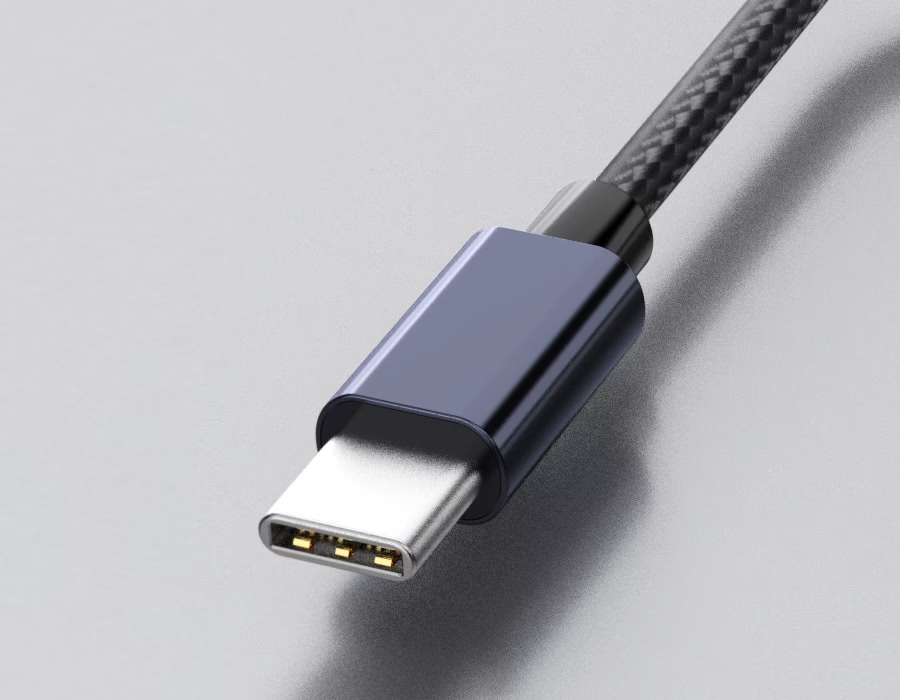
USB-C Pinout Overview
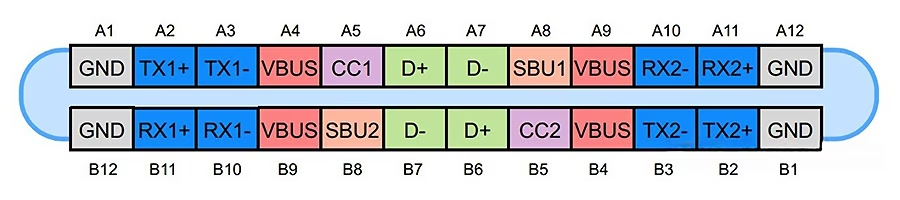
USB-C is a compact reversible connector with 24 pins. Each pin has a distinct purpose, such as handling video, transferring data, or charging your device.
USB-C Pinout Table
| Pin (A Side) | Pin (B Side) | Function | Description |
|---|---|---|---|
| A1 | B12 | GND | Ground return path |
| A2 | B11 | SSTXp1 / SSRXp1 | SuperSpeed TX1+/RX1+ differential pair |
| A3 | B10 | SSTXn1 / SSRXn1 | SuperSpeed TX1–/RX1– differential pair |
| A4 | B9 | VBUS | Power delivery (5V–20V, up to 5A) |
| A5 | – | CC1 | Configuration Channel 1 (orientation & PD negotiation) |
| – | B5 | CC2 | Configuration Channel 2 (orientation & PD negotiation) |
| A6 | B7 | D+ / D– | USB 2.0 differential pair |
| A7 | B6 | D– / D+ | USB 2.0 differential pair |
| A8 | – | SBU1 | Sideband Use 1 (video/audio alternate mode) |
| – | B8 | SBU2 | Sideband Use 2 (video/audio alternate mode) |
| A9 | B4 | VBUS | Power delivery |
| A10 | B3 | SSRXn2 / SSTXn2 | SuperSpeed RX2–/TX2– differential pair |
| A11 | B2 | SSRXp2 / SSTXp2 | SuperSpeed RX2+/TX2+ differential pair |
| A12 | B1 | GND | Ground return path |
💡 Pro Tip: When CC1/CC2 and SBU1/SBU2 are specified individually, it is clear which pin performs which function, per USB Type-C Spec 2.1.
Power Delivery (PD)
Power is supplied via VBUS pins. Power Delivery (PD) can supply up to 20V at 5A, for a total of 100W; however, by default, it only provides 5V.
- Charge laptops, phones, and accessories using a single port.
- Power Delivery adjusts the voltage and current on the fly.
- Ground pins ensure safe, stable high-current transmission.
Data Lines and SuperSpeed Pairs
USB-C retains the legacy USB 2.0 lines (D+/D-) for backwards compatibility.
The SuperSpeed pairs (TX/RX) support up to 40 Gbps of data throughput over USB4 or Thunderbolt 4. The port automatically routes the right pairings, regardless of orientation.
Configuration and Alternate Modes
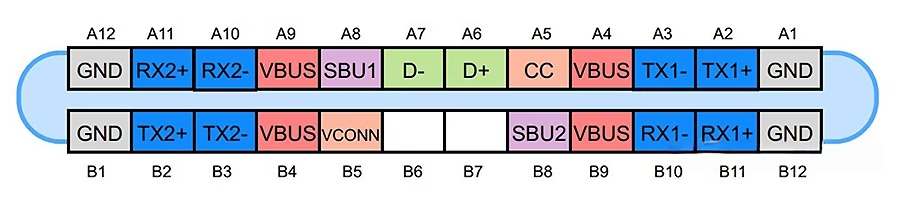
- CC1/CC2 pins: Detect plug orientation, assign source and sink roles, and begin Power Delivery negotiation.
- VCONN: Powers electronics inside e-marked cables.
- SBU1/SBU2 pins: Carry video (DisplayPort) or audio signals in alternative modes, allowing a single connector to perform multiple roles.
Picking the Right USB-C Cable
Not all USB-C cables are created equal.
Tips:
- Check the rating: 3A or 5A for power; USB 3.1/3.2/USB4 for data
- Search for authorized E-Marker chips on high-power cables.
- Check what the port supports: Charge-only vs. data/video.
Common USB-C Configurations
| Application | Pins Used | Features Enabled |
|---|---|---|
| USB 2.0 Device | D+/D– only | Basic data + 5V charging |
| USB 3.2 | D+/D– + TX/RX | High-speed data |
| USB-C PD | CC pins + VBUS/GND | Dynamic charging |
| DisplayPort Alt Mode | TX/RX + SBU | Video output |
| Audio Adapter | SBU + D+/D– | Analog audio over USB-C |
Troubleshooting USB-C Connections
Typical issues:
- The cable is not rated for the needed power or data speed.
- Dirt or corrosion in the connector
- PD negotiation fails
- Using passive adapters that don’t pass all pins
💡 Pro Tip: Always use certified E-Marker cables for 5A power delivery.
Custom USB-C Cables: Tailored for Your Needs
While most users are satisfied with off-the-shelf cables, industrial and embedded systems often require customized USB-C assemblies due to performance, durability, or unique pin layout requirements.
Customization options include length, shielding, overmolding, and jacket materials like PUR or LSZH for use in harsh environments. Whether you need USB-C to USB-A, USB-C to Micro-B, or a complete cable harness, specialized customization ensures signal integrity and long-term reliability.
👉 Need a specialized USB-C cable for your system? Request a quote.
FAQs
A: There are 24 pins arranged symmetrically, allowing you to plug it in either direction.
A: Up to 20V at 5A, or 100W maximum.
A: No, DisplayPort or HDMI Alt Mode may only be used with cables that have SuperSpeed and SBU lines.
A: Nope. Some support complete data and other modes, while others merely charge.
A: Electronics within e-marked cables are powered by a 5V supply on the CC pins.
Conclusion
USB-C is more than just a port; it’s a whole system that combines data, video, and power. Engineers and users can design, select, and troubleshoot connections with confidence when they are familiar with the pinout.
.avif)
Sam Wu is the Marketing Manager at Romtronic, holding a degree in Mechatronics. With 12 years of experience in sales within the electronic wiring harness industry, he manages marketing efforts across Europe. An expert in cable assembly, wiring harnesses, and advanced connectivity solutions, Sam simplifies complex technologies, offering clear, actionable advice to help you confidently navigate your electrical projects.