 Premier Manufacturer

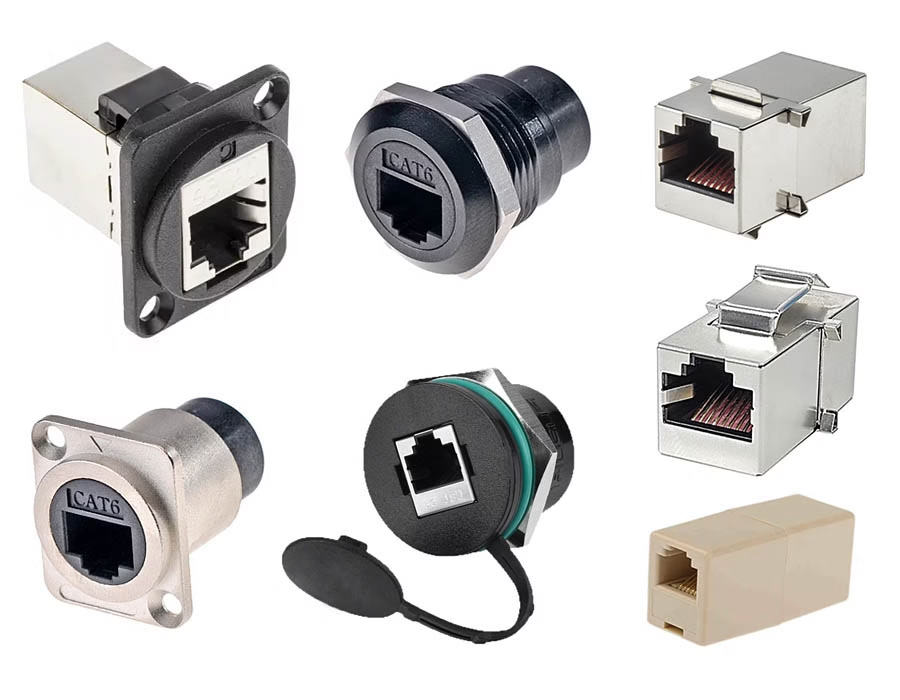
RJ45 couplers (called Ethernet couplers) let you join two end-to-end cables. Networking setups—from data centers to home LANs—provide a quick way to extend cable runs without installing a long custom cable.
They are passive connectors with an RJ45 port on each side. You plug two cables into the coupler, and the signal passes through.
What Are RJ45 Couplers?
An RJ45 coupler is a simple female-to-female connector for Ethernet cables. It contains no active electronics; it only aligns the eight wire pairs on a small circuit board.
For instance, plugging two Cat6 patch cables into a Cat6 coupler lets you treat them as one longer cable. This passive design means the coupler does not convert or reshape the signal.
Performance Impact of Couplers
A good-quality RJ45 coupler does not reduce the network speed by itself. Couplers are passive, so a properly matched coupler allows two cables to operate at full rated speed (for example, gigabit over 100m) with no inherent slowdown.
If you see a significant speed drop, it usually means one of the cables or connectors (or the coupler) is faulty.
| Metric | Direct Cable | With One Coupler |
|---|---|---|
| Bandwidth Support | Up to cable/category rating | Same if coupler matches cable |
| Insertion Loss | Standard per cable spec | Very low (minimal added loss) |
| Total Link Length | Up to 100m (Cat5e/Cat6) | Still 100m total (coupler does not extend limit) |
| Speed Impact | None | None if spec met |
Cable Length Limits
Ethernet standards still limit a link to about 100 meters of cable. A coupler does not increase this length. If you use a coupler so that the total cable run exceeds 100m, you will see signal degradation. This is not the coupler “slowing” the network, but simply exceeding the cable’s physical limit.
Matching Cable Category
Always use a coupler rated for your cable. For example, using a lower-category coupler (Cat5e) on higher-speed cable (Cat6A) can create a bottleneck in data transmission speed. Also, use a shielded coupler if you use shielded (STP) cable. A shielded coupler preserves EMI protection, whereas an unshielded coupler on STP cable could degrade performance.
Number of Couplers
Each coupler adds a connection point (and potential failure point) to the link. Best practice is to keep couplers to a minimum. Industry experts advise using no more than a few couplers per cable segment. For example, they recommend no more than three couplers in a Cat5e/Cat6 2.5Gb/s or 5Gb/s run, and no more than two couplers in a Cat6A 10Gb/s run. If you don’t know the quality of the coupler, stick to just one. In short, one or two quality couplers are fine, but daisy-chaining many can introduce failures.
Best Practices for Using Couplers
- Match Categories: Choose the highest-rated coupler (e.g., Cat6A) and ensure it matches your cable.
- Stay Within Length: Keep the total cable run (including couplers) under 100m.
- Use Shielded as Needed: Pair shielded cables with shielded couplers to maintain EMI protection.
- Minimize Couplers: Use as few as possible (ideally 1–2). Avoid three or more on high-speed links.
- Check Quality: Use reputable, well-made couplers. Cheap or damaged couplers might not reliably connect all eight pairs.
- Test the Link: After adding a coupler, test the cable or run a speed test to confirm performance.
Choosing a Quality Coupler
A correctly used RJ45 coupler will not inherently slow down your network. To ensure this, use couplers built to specification and follow the guidelines above. For example, Romtronic offers high-quality Cat6 and Cat6A RJ45 couplers designed to meet Ethernet standards. Using a reliable Romtronic coupler (with proper wiring and link length) helps maintain full performance of your Ethernet connection, just as if it were one continuous cable.
.avif)
Sam Wu is the Marketing Manager at Romtronic, holding a degree in Mechatronics. With 12 years of experience in sales within the electronic wiring harness industry, he manages marketing efforts across Europe. An expert in cable assembly, wiring harnesses, and advanced connectivity solutions, Sam simplifies complex technologies, offering clear, actionable advice to help you confidently navigate your electrical projects.

