When setting up a new gaming rig or workstation, comparing an HDMI cable vs. a DisplayPort cable is usually the first step. Both standards carry high-definition video and audio over a single connection, making them essential components in modern displays. However, choosing between an HDMI cable and a DisplayPort cable comes down to key differences in connectors, data rates, and features that can directly affect your device’s performance. As a leading cable assembly manufacturer, we break down the definitive comparison between HDMI and DisplayPort cables below.
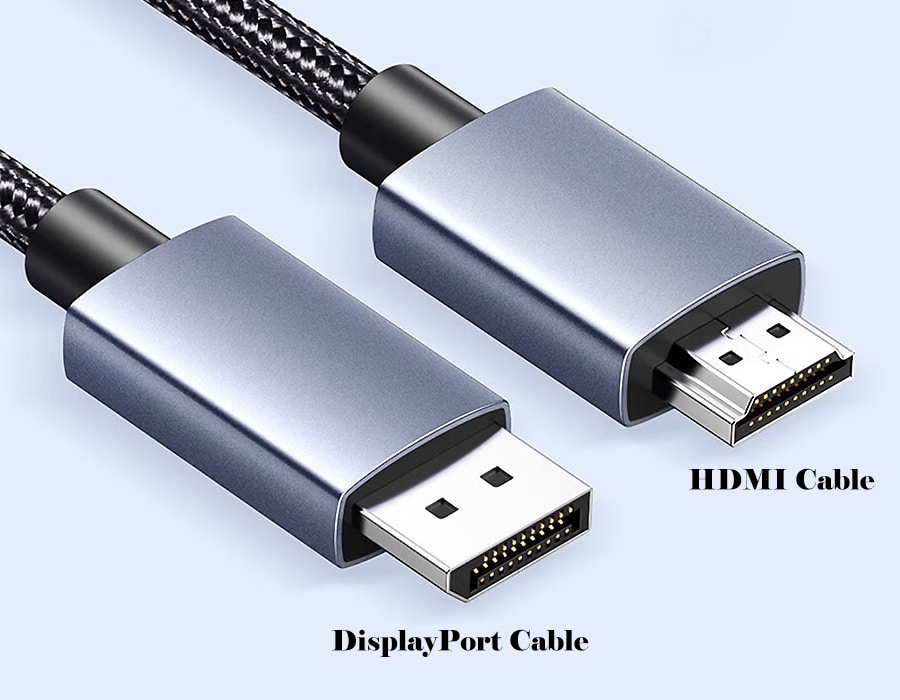
- HDMI was introduced in 2002 for consumer electronics. It carries video/audio on 19 pins and is found on TVs, consoles, Blu-ray players, and more. HDMI cables have standard (Type A), mini (Type C), and micro (Type D) plugs.
- DisplayPort (DP) was introduced by VESA in 2006 to replace VGA/DVI. It uses a 20‑pin connector (standard or Mini-DisplayPort) with a latch to secure it. (Mini DP was standard on older Macs, but many newer devices use USB‑C alt-mode instead.)
Common Features
- Both HDMI and DisplayPort transmit high-definition video and audio over a single cable.
- Both use sturdy connectors and generally support backward and forward compatibility.
- Both are essential components in modern custom wire harnesses for industrial and consumer applications.
Key Differences Between HDMI and DisplayPort Cables
Connectors & Latches
HDMI cables usually have 19 pins and often lack a locking latch, making them easier to plug in. DisplayPort cables have 20 pins and include a small latch clip to secure the connection. In practice, HDMI is simpler to connect, while the DisplayPort latch keeps the cable firmly in place.
Bandwidth & Resolution
DisplayPort generally supports higher data rates (“DP wins the spec war over HDMI”). For example, HDMI 2.0 tops out at 18 Gbps (enough for 4K at 60Hz), whereas DisplayPort 1.4 offers 32.4 Gbps (enough for 4K at 120Hz or 8K at 30Hz). With newer versions, HDMI 2.1 provides up to 48 Gbps, enabling 4K@144Hz or 8K@60Hz.
However, DisplayPort 2.0/2.1 doubles that to 80 Gbps, supporting 10K@60Hz (without compression) or even 16K@60Hz with DSC. In short, today’s DisplayPort can carry more pixels and higher refresh rates than HDMI, although HDMI 2.1 has closed the gap.
Refresh Rate & Gaming
Due to its higher bandwidth, DisplayPort often enables smoother high-refresh gameplay. For instance, HDMI 2.0 only supported 4K@60Hz, whereas DisplayPort 1.3 supported 4K@120Hz. Both HDMI (with the newer 2.1 standard) and DisplayPort support Variable Refresh Rate (VRR) technologies, such as FreeSync and G-Sync. (Originally, NVIDIA’s G-Sync required DisplayPort, but HDMI 2.1 also adds full VRR support.)
Multi-Monitor (MST)
DisplayPort supports daisy-chaining multiple displays via Multi-Stream Transport (MST). A single DP output can drive two or more monitors (sharing bandwidth). HDMI does not support daisy-chaining – one HDMI port drives only one screen at a time.
Audio Features
HDMI supports an Audio Return Channel (ARC/eARC) for sending audio from your TV back to a receiver, whereas DisplayPort lacks this capability. This makes HDMI handy in home theatres for simplifying audio cabling.
Cable Length
HDMI cables typically maintain signal over longer runs (up to ~100 ft for 1080p, ~30 ft for 4K). DisplayPort cables typically have a maximum length of about 10 feet for high-resolution signals. In practice, long-run video (like projectors) often favors HDMI.
Compatibility & Devices
HDMI is the universal connector on TVs, game consoles, and media devices. DisplayPort is standard on PCs, laptops, and high-end monitors. In specialized sectors like medical wiring harnesses or automotive systems, the choice between the two depends on the specific hardware interface required.
Comparison Table
| Feature | HDMI 2.1 (Newest HDMI) | DisplayPort 2.1 (Newest DP) |
|---|---|---|
| Max Bandwidth (Gbps) | 48 | 80 |
| Max Resolution & Refresh | 8K @ 60Hz, 4K @ 144Hz | 16K @ 60Hz (with DSC), 8K @ 60Hz, 4K @ 240Hz |
| Multi-Display | No | Yes (MST daisy-chain) |
| Audio Return (ARC/eARC) | Yes | No |
| Connector Locking | Friction-fit (no latch) | Latching clip for secure fit |
Which Cable Should You Pick?
It often comes down to your setup. For home theatre and video sources, HDMI is usually the better choice. TVs, Blu-ray players, and consoles (like PS5/Xbox Series X) use HDMI, and HDMI 2.0+ is required for 4K HDR or 4K@120Hz content.
On the other hand, gaming PCs and monitors can fully leverage DisplayPort’s higher bandwidth and multi-monitor capabilities. High-refresh gaming monitors almost always have a DisplayPort input, and DP enables you to use technologies like G-Sync. For example, many gamers use DisplayPort 1.4 or 2.0 on their PC graphics cards to drive 144Hz or higher at 4K resolution, while HDMI on the latest consoles supports 60–120Hz at 4 K.
In the end, there’s no one-size-fits-all winner. If you’re connecting a laptop or console to a TV, HDMI is the preferred option. If you’re hooking up a high-end gaming PC to a fast monitor (or daisy-chaining multiple screens), DisplayPort is ideal. The table above, along with the points covered, can help you make the best choice for your devices.
Frequently Asked Questions (FAQ)
Answer: Going from a DP computer to an HDMI TV is super simple with a basic adapter. But going the other way—like hooking up an HDMI console to a DP monitor—is trickier. You’ll need an active converter because the two systems speak completely different languages.
Answer: It usually comes down to two things: locking connectors and multi-monitor setups. DisplayPort cables have built-in latching clips so they don’t accidentally wiggle loose. Plus, DP supports daisy-chaining, meaning you can run multiple screens off a single port.
Answer: Right now, DisplayPort takes the crown. The latest DisplayPort 2.1 tops out at a massive 80 Gbps, while HDMI 2.1 maxes out at 48 Gbps. Both are incredibly fast, but DP handles higher ceilings for raw data.
Answer: Yep, they do. Both DisplayPort and the newer HDMI 2.1 standard fully support Variable Refresh Rate (VRR). Whichever one you pick, you’ll get smooth, tear-free gameplay as long as your hardware matches up.
Answer: Unlike cheap consumer cables, industrial cables need extreme testing. At Romtronic, we use a 300% inspection process, including automated signal-integrity checks and 10,000+ bending tests to ensure they withstand harsh robotic environments.
.avif)
Sam Wu is the Marketing Manager at Romtronic, holding a degree in Mechatronics. With 12 years of experience in sales within the electronic wiring harness industry, he manages marketing efforts across Europe. An expert in cable assembly, wiring harnesses, and advanced connectivity solutions, Sam simplifies complex technologies, offering clear, actionable advice to help you confidently navigate your electrical projects.