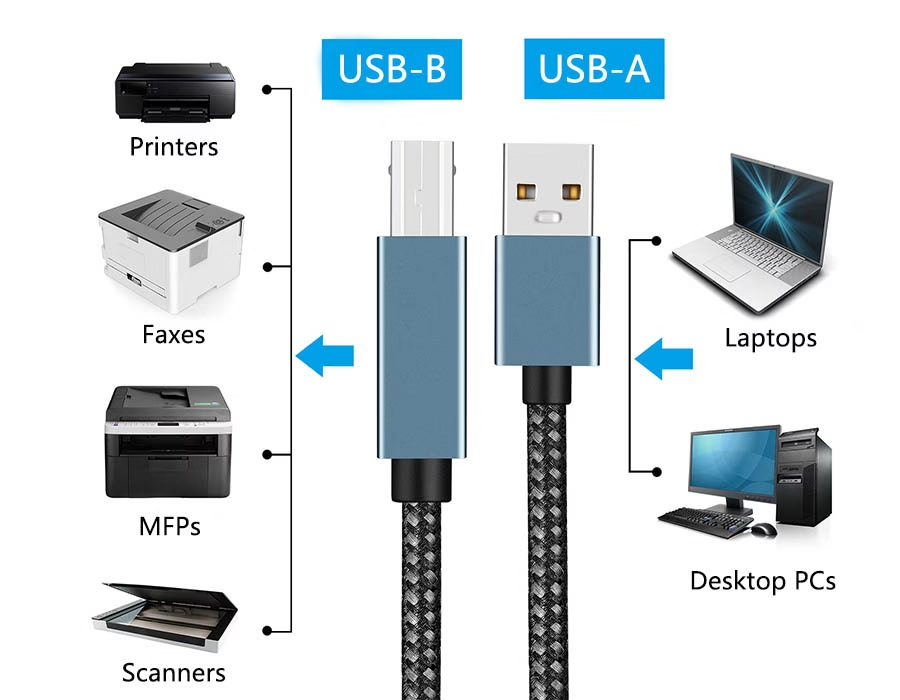
USB Type-B connectors are the square-ish plugs found on many peripheral devices. While USB Type-A plugs on PCs and hosts carry power and signals downstream, Type-B plugs are typically found on devices such as printers, scanners, audio interfaces, and external drives. In other words, a USB A-to-Type B cable connects a computer’s USB port to a device’s USB-B port.
This split (“USB type A – USB type B”) ensures that power originates from the host (computer) and flows to the peripheral. Historically, USB Type-B was designed to link hosts to devices such as printers, external hard drives, and USB hubs.
USB Type B Connector Types
USB Type-B comes in several types, each with distinct shapes and use-cases:

- Standard Type-B (USB 2.0): The classic square connector commonly found on printers, scanners, and larger devices. It has 4 pins (VBUS, D–, D+, GND) and supports USB 2.0 speeds (480 Mbps) and 5 V power.
- USB 3.0/3.1 Type-B (SuperSpeed): A larger variant with additional pins (9 pins total) for high-speed USB 3.x (up to 5 Gbps for USB 3.0/3.1 Gen1). It features a notched design and is often colored blue on the inside. You’ll see these on USB 3.0 hubs, printers, scanners, and high-performance external hard drives. (USB 3.x Type-B plugs are backward-incompatible with USB 2.0 ports, so the shapes differ.)
- Mini-B and Micro-B: These are minor variants (used on cameras, older mobile devices, and small drives). Mini-B was common on older cameras, while Micro-B (including the USB 3.0 Micro-B) has 5 to 10 pins and is typically used for phones and portable drives. These are technically Type-B family connectors but are used on compact devices.
Each type ensures reliable, keyed connections. For example, standard Type-B plugs won’t fit Type-A sockets (and vice versa), preventing mis-wiring. The table below details the pinout for the Standard USB 2.0 Type-B and the SuperSpeed USB 3.0 Type-B connectors:
| Pin (Standard B) | Signal | Function |
|---|---|---|
| 1 | VBUS | +5 V power (VBUS) |
| 2 | D– | USB 2.0 data line (–) |
| 3 | D+ | USB 2.0 data line (+) |
| 4 | GND | Ground |
| Pin (SuperSpeed B) | Signal | Function |
|---|---|---|
| 1 | VBUS | +5 V power |
| 2 | D– | USB 2.0 data (–), backward-compatible |
| 3 | D+ | USB 2.0 data (+) |
| 4 | GND | Ground (shield) |
| 5 | GND | Ground (connector shell) |
| 6 | SSRX– | SuperSpeed Receiver (–) |
| 7 | SSRX+ | SuperSpeed Receiver (+) |
| 8 | SSTX– | SuperSpeed Transmitter (–) |
| 9 | SSTX+ | SuperSpeed Transmitter (+) |
Each SuperSpeed (USB 3.0) pair (SSRX+/-, SSTX+/-) carries the high-speed differential signals. Typical wire colors in USB cables are red (VBUS), white/green (D–/D+), black (GND) for USB 2.0, and often blue/purple/gray/orange for the extra USB 3.0 pairs. These connectors are keyed so that Type-B cables mate only with Type-B ports, preventing misconnection with Type-A ports.
Applications in Printers, Storage, and Audio
USB Type-B is still widely used in industry and computing peripherals. It connects a range of equipment to hosts:
- Printers and Scanners: Almost all USB printers and scanners use a Type-B port. Commonly referred to as “printer cables,” USB A-to-B cables are the standard method for connecting a PC to a printer.
- External Hard Drives: Some full-sized desktop external HDD enclosures and backup drives employ USB Type-B or USB 3.0 Type-B ports. These sturdy connectors handle the frequent plugging and unplugging of heavy drives.
- Audio Interfaces and Mixing Consoles: Many professional audio devices (audio interfaces, mixers, DACs) use USB Type-B for reliable multichannel audio data transfer. Engineers often refer to these USB “B” ports on their equipment.
- USB Hubs and Peripherals: Downstream hubs and devices typically have a Type-B upstream port to connect to the host. For example, a monitor’s USB hub often includes a Type-B port for the upstream link, as users have noted.
- Other Equipment: Certain industrial controllers, printers, and legacy devices continue to use USB Type-B for data and power. Some televisions and routers have a USB-B port (often for service or upstream use).
In fact, “USB B was meant to connect to printers, external drives, USB hubs for port expansion, and more”. This design choice means that USB Type-B connectors remain common on the device side, whereas Type-A connectors remain on the host side.
Technical Tips for USB-B Use
- Cable Selection: Always use the correct “USB Type B cable” for your desired speed. For USB 3.0, a certified SuperSpeed USB 3.0 A-to-B cable has the extra wires (often thicker and sometimes blue). For USB 2.0 devices, a standard USB 2.0 A-to-B cable is fine.
- Connector Gender: Device Type-B ports are female, and cables have a male Type-B plug. Avoid forcing plugs; Type-B connectors are keyed to mate only one way.
- Power Considerations: USB 2.0 Type-B ports supply up to 500 mA at 5 V; USB 3.0 ports supply up to 900 mA. For devices that require more power (such as some drives), verify whether an external power supply or a “powered” USB-B port is needed (rare on Type-B, more common on USB-C).
- Signal Integrity: Keep cables relatively short for best performance (especially at USB 3.x speeds). Shielded cables can help prevent interference in noisy environments.
By understanding these formats and use cases, engineers and IT professionals can design systems that leverage USB Type-B where appropriate and plan migrations to USB-C without losing support for essential devices.
Partnering with Romtronic for USB Connectors
Choosing quality connectors and cables is critical, and Romtronic is a reputable OEM/ODM manufacturer specializing in custom wire harnesses and cable assemblies. We offer reliable USB Type-B connectors (including Type-A, Type-C, etc.) that meet industry standards.
By partnering with a manufacturer like Romtronic, businesses can source customized USB Type-B ports and cables, ensuring compliance (CE, RoHS, UL) and durability.
Whether you need USB-A to Type-B cables for legacy devices or specialized USB-B to USB-C solutions for hybrid setups, Romtronic’s experience in USB cable design and production can help future-proof your devices.
In summary, USB Type-B connectors provide a stable, well-defined interface for many peripherals (printers, scanners, hard drives, audio equipment). Understanding their pinouts and formats lets designers and technicians use them effectively.
By partnering with OEM/ODM companies like Romtronic, businesses can ensure their USB-B connectors and cables are built to last and compatible with newer USB standards.
.avif)
Sam Wu is the Marketing Manager at Romtronic, holding a degree in Mechatronics. With 12 years of experience in sales within the electronic wiring harness industry, he manages marketing efforts across Europe. An expert in cable assembly, wiring harnesses, and advanced connectivity solutions, Sam simplifies complex technologies, offering clear, actionable advice to help you confidently navigate your electrical projects.