The ongoing advancement of display technology continues to enable thinner, smaller, and more power-efficient electronic display devices. As such, the means by which internal video signals are transmitted have evolved substantially over the years. Many of today’s devices and embedded systems use the industry-standard eDP (Embedded DisplayPort) to transmit internal video signals. The eDP is currently being phased in to replace older technologies, such as LVDS.
This guide explains what an eDP cable is, why manufacturers prefer it, and what to consider when selecting or customising one for modern display designs.
What is an eDP Cable?
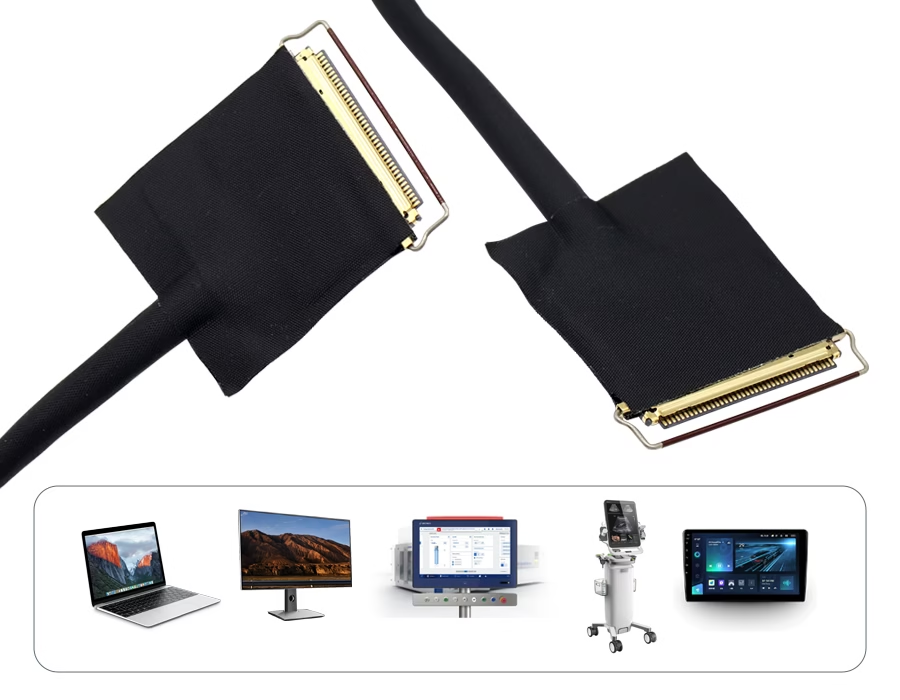
The Embedded DisplayPort (eDP) cable is a high-performance digital interface that connects the motherboard (or graphics controller) to the device’s internal display panel. Unlike standard DisplayPort cables used to connect external monitors, the eDP cable is designed for short-range embedded displays within a device.
The eDP standard is based on the VESA DisplayPort standard and supports high-speed video transmission and control signalling via both the Main Link and AUX Channel methods. In many manufacturing products today, power lines are integrated into the product’s cable assembly, allowing display/control/power connections to be combined into a more compact internal harness.
eDP is widely used in laptops, all-in-one PCs, industrial displays, and other embedded systems that require stable, high-resolution internal display links.
Why eDP Replaced LVDS
LVDS was once the dominant interface for internal displays, but it has become inefficient as resolution and refresh-rate requirements have increased.
Compared with LVDS, eDP offers:
- Higher bandwidth, enabling high-resolution and high-refresh displays when properly configured
- Lower power consumption, especially with features such as Panel Self-Refresh (PSR)
- Reduced cable complexity, using fewer signal pairs and more miniature connectors
- Better scalability, supporting future display upgrades without redesigning the entire interface
For modern display manufacturers, eDP simplifies system design while improving overall performance and efficiency.
Key Advantages of eDP for Manufacturers
High Performance and Bandwidth
eDP uses packet-based transmission and high-speed differential signalling. With sufficient lane count and compatible eDP versions, it can support demanding display requirements such as high resolution and high refresh rates.
Power Efficiency
A key feature of eDP is Panel Self-Refresh (PSR). When the displayed image remains static, the panel can refresh itself from local memory, allowing the graphics processor to enter a low-power state and reducing overall system power consumption.
Compact, Space-Saving Design
Compared to LVDS, eDP requires fewer signal wires and uses micro-pitch connectors. This significantly reduces cable bulk, making eDP well-suited for thin laptops, compact embedded devices, and space-constrained designs.
Integrated Cable Assembly Design
Although eDP itself defines video and control signalling, manufacturers often integrate power, grounding, and shielding into a single custom eDP cable assembly, simplifying internal wiring and improving assembly efficiency.
Common Applications of eDP Cables
eDP cables are commonly used in:
- Laptops and notebooks
- All-in-one PCs
- Industrial and embedded displays
- Medical and diagnostic equipment
- Automotive display systems (PC-class platforms)
In real-world designs, eDP cables are often part of larger internal wire harness assemblies that combine display signals with power and control lines to simplify installation and improve system reliability.
Typical eDP Cable Configurations
While eDP cables are not universal, most designs share similar characteristics:
- Connector pin count: Commonly 30-pin or 40-pin
- Cable construction: Micro-coax or shielded flat cable for signal integrity
- Lane configuration: 1, 2, or 4 lanes, depending on resolution and refresh requirements
- System compatibility: The cable, panel, and graphics source must support the same eDP version and configuration
Correct configuration is essential for stable performance and reliable mass production.
Practical Tips for Choosing an eDP Cable
When selecting or customising an eDP cable, manufacturers should consider:
- Panel and board compatibility (pinout and supported eDP version)
- Target resolution and refresh rate
- Cable length and internal routing constraints
- Connector quality and mechanical reliability
- Supplier engineering support and production consistency
In many applications, standard cables are not sufficient. Manufacturers often work with experienced partners to develop custom eDP cable assemblies that match specific panel layouts, connector requirements, and signal-integrity requirements.
Frequently Asked Questions About eDP Cables.
What is an eDP cable used for?
An eDP cable connects a device’s motherboard to its internal display panel in laptops and embedded display systems.
Why did eDP replace LVDS?
Because eDP supports higher bandwidth, lower power consumption, and simpler internal cabling.
Is eDP suitable for high-resolution displays?
Yes, when the correct eDP version and lane configuration are used.
Are eDP cables universal?
No. Connector type, pinout, and lane configuration must match the panel and system design.
Can eDP cables be customised?
Yes. Length, connectors, shielding, and mechanical structure can be customised for specific applications.
Conclusion
The eDP (Embedded DisplayPort) cable plays a significant role in today’s internal display systems on most modern PCs and embedded devices, which require high resolution and low power consumption and are designed to be as small as possible. To ensure manufacturers create reliable, future-proof products, they must understand both the true capabilities of the eDP and its design limits.
.avif)
Alex Wang is the Marketing Manager at Romtronic, with a degree in International Business and over seven years of experience in the electronic cable and wire harness industry. He leads marketing efforts across North and South America, combining deep industry knowledge with strong sales experience.
In addition to overseeing global marketing strategy, Alex is also responsible for content development and editorial coordination, ensuring that Romtronic’s messaging remains clear, consistent, and engaging. His strength in market analysis and customer-focused approach helps clients make more informed purchasing and sales decisions.